Dhaka ·
  Thimphu ·
  Vancouver · Since 2012
Most restaurants in Bangladesh start with a billing till. It prints a bill, and for a while that feels like enough. Then the questions start: why did the chicken run out on a Friday night, why does the stock count never match the sales, and why does the month-end take the accountant a week?
Restaurant management software answers those questions by joining the front of house to the back of house. This guide explains what it should cover, from the table order and the kitchen order ticket to purchasing, the store, the kitchen and the books, and what to ask in a demo before you choose a system such as FLEX POS.
What restaurant management software should cover
A restaurant is really five small businesses under one roof: the floor that takes orders, the counter that collects money, the purchasing desk, the store and the kitchen. Each one produces numbers, and the owner needs them to agree.
Good restaurant management software keeps all five in one system, so an order at the table, the stock it uses and the money it brings in are recorded once and seen by everyone who needs them.
- Point of sale: table orders, kitchen order tickets and bills
- Procurement: requisitions, supplier quotations and purchase orders
- Store and inventory: receiving, issuing and monthly stock closing
- Food production: the kitchen's own requisitions, consumption and stock
- Accounts: ledgers, trial balance, profit and loss and balance sheet
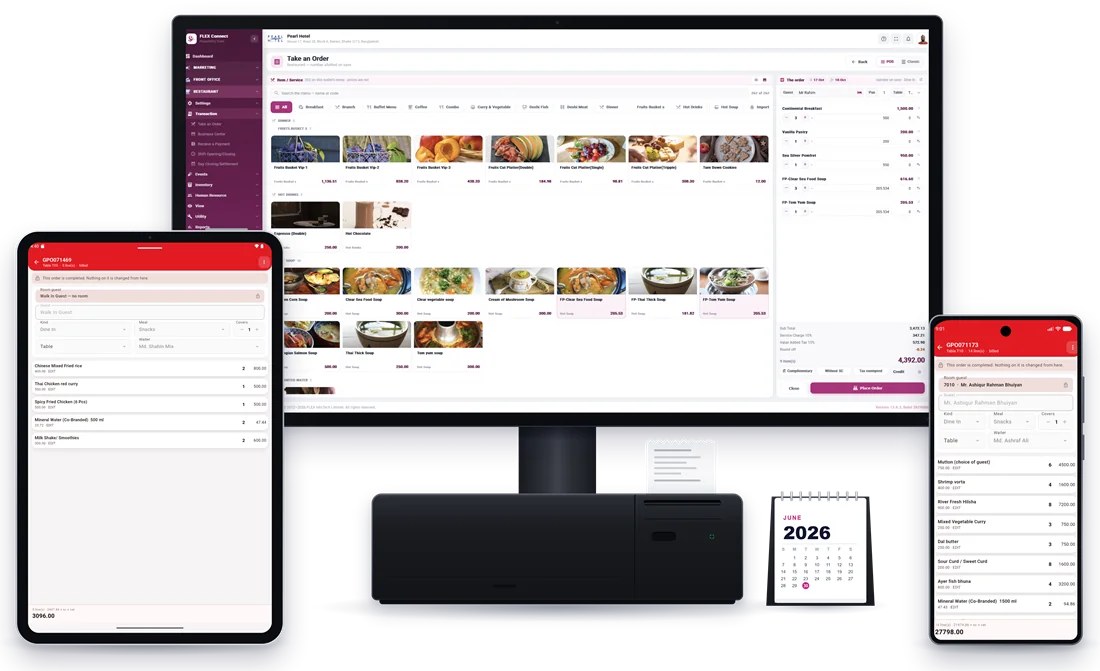
Front of house: table orders, KOT and billing
On a busy evening the waiter should take the order once, at the table, and the kitchen order ticket (KOT) should print from that same order. When the guest asks for the bill, it is made from the order, not typed again, so nothing is missed and nothing is added by mistake.
Bills in Bangladesh must show VAT correctly, and many restaurants also add a service charge. These should be set up centrally by an authorised person, not keyed in by each cashier, and the bill should show each charge clearly. In FLEX POS, service charge and VAT come from the rates set up in the Back Office, and a bill can be marked without service charge or as tax exempted when that applies. Ask your accountant to check the setup against current rules before you go live.
At the end of each shift the cashier closes it, and at the end of the day the outlet closes its day with a settlement. That keeps late bills from slipping into the wrong date and gives the owner one set of figures for the day.
Back of house: purchasing and the store
Food cost is decided long before the plate leaves the kitchen. It starts with what you buy, from whom and at what price. A simple, written purchasing routine protects margins more than any discount at the till.
In a well-run restaurant, buying starts from a list of what is needed and a purchase requisition. Suppliers are asked for quotations, the quotations are compared item by item, and only then is a purchase order raised and approved by the owner or manager. The store receives the goods against the order, issues them to the kitchen and bar against requisitions, records damage and returns, and closes stock every month.
- Purchase requisitions instead of verbal orders
- Requests for quotation and comparative statements
- Purchase orders approved by management, also from the phone
- Receiving against the purchase order
- Issues to the kitchen and bar against requisitions
- Monthly stock closing for the main store and sub stores
The kitchen: stock you can actually count
Many restaurants know what the store issued but not what the kitchen used. Giving the kitchen its own workspace closes that gap. Chefs raise requisitions to the main store, record what they receive, use, return and damage, and close the kitchen's stock each month.
When table bookings, events and banquet quotations are shared with the kitchen, the chef also knows what is coming before it arrives, which makes ordering and preparation easier on the busiest days.
The books: from daily sales to the trial balance
Owners want to know whether the restaurant made money this month, not just how much it sold. That needs proper accounts: a chart of accounts, vouchers and ledgers, cost centers for each outlet, and the trial balance, profit and loss account and balance sheet on demand.
When the accounts sit in the same system as the orders and the stock, the month-end becomes a check rather than a rebuild. FLEX Accounts covers bank reconciliation, month closing and financial year closing as well.
Cafés, bars and more than one outlet
If you run a café, a bar or a lounge alongside the restaurant, each should run as its own outlet with its own tables, menu, suppliers and cashier shift. Takings and stock then never mix, and you can see which outlet is really earning.
Owners with more than one outlet also want the figures away from the counter. Look for a system whose sales, orders and statistics are on the phone, so you can check the day from anywhere.
Questions to ask in every demo
Ask the vendor to show, not just tell, using a typical bill and a typical week from your own restaurant.
- Does the KOT print from the same order as the bill?
- How are VAT and service charge set up, and who can change them?
- Can a café or bar run as a separate outlet with its own cashier shift?
- Does the POS share item records with the store and the kitchen?
- Are purchase orders approved before goods are bought?
- Can I see the trial balance and profit and loss without exporting to Excel?
- Can I check daily sales from my phone?
- Is support available in Bangladesh, and at what hours?
Frequently asked questions
What is the difference between a POS and restaurant management software?
A POS takes orders and prints bills. Restaurant management software also covers what happens behind the counter: purchasing, the store, the kitchen's stock and the accounts. FLEX POS combines all of these, so sales, stock and the books come from one system.
Does FLEX POS print kitchen order tickets?
Yes. The kitchen order ticket prints from the same order the waiter takes at the table, and the bill is made from that order at the counter.
Can a small café use restaurant management software?
Yes. A café can start with the point of sale and add procurement, inventory or accounts later on the same data. Smaller businesses often benefit most, because one person usually handles buying, stock and money.
Do you support restaurants outside Dhaka?
Yes. FLEX POS is cloud software that runs in any modern web browser, with the point of sale, procurement, store and accounts screens also on the FLEX Connect mobile app (Android & iOS). FLEX InfoTech supports customers across Bangladesh and in Bhutan 24/7.