Dhaka ·
 Thimphu ·
 Vancouver · Since 2012

In many hotels, restaurants and offices, buying still starts with a phone call. The chef tells the purchase officer that oil is running low, the officer calls a familiar supplier, and the goods arrive with a bill. Nobody compared prices, nobody approved the order, and at month-end nobody can say why the cost of goods went up.
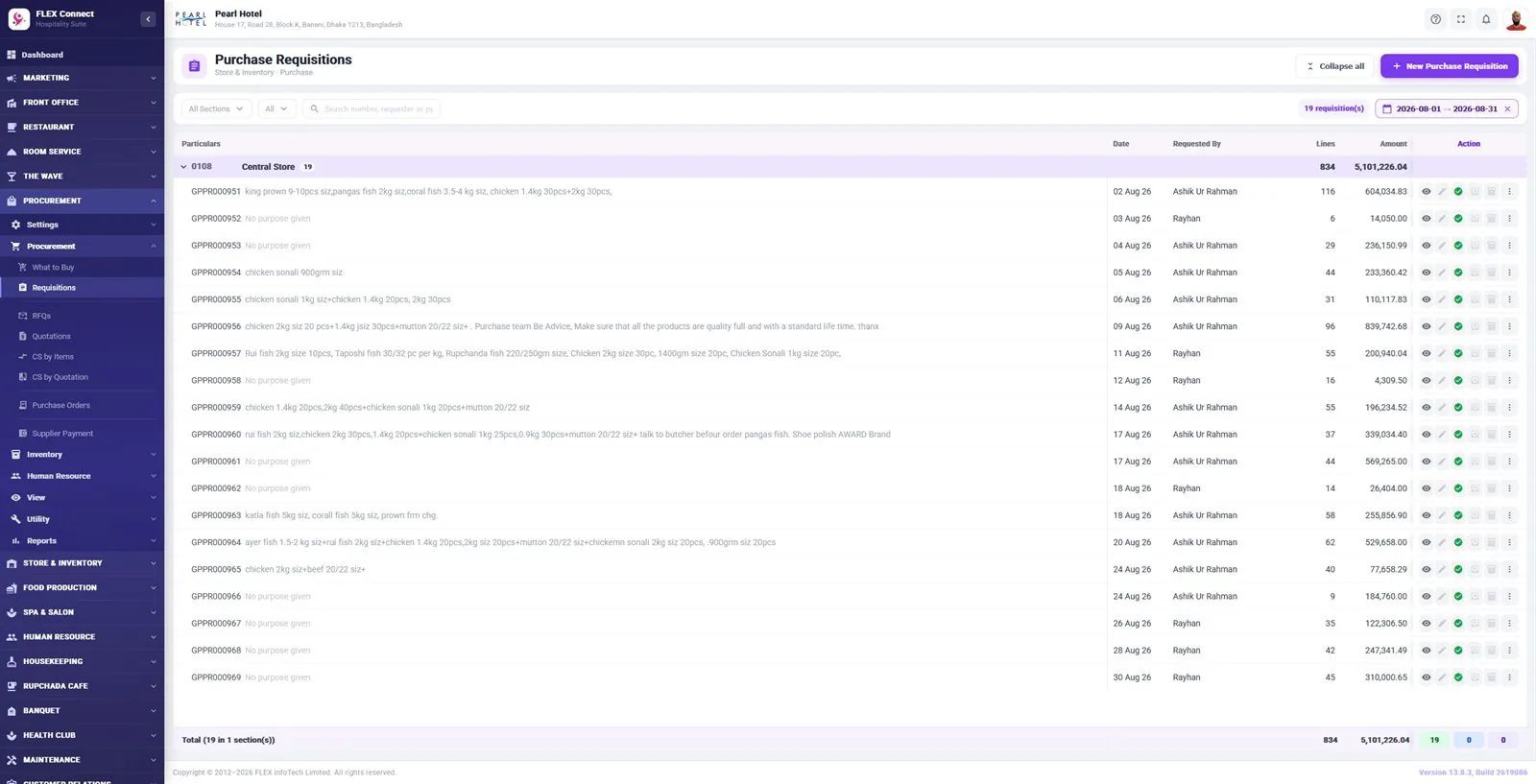
A written purchase requisition process fixes this without slowing the business down. This guide walks through each step, from the first request to the approved purchase order and the goods in the store, and shows how procurement software such as FLEX Inventory keeps every step on record.
What is a purchase requisition?
A purchase requisition is an internal request to buy something. It says what is needed, how much, by when and for which department. It is not an order to a supplier. It is the first record that a need exists, and it gives the purchase team and management something to check before money is committed.
A purchase order is the next document. It goes to the supplier and confirms what you will buy, at what price and on what terms. The gap between the two is where savings are made: that is where you compare suppliers and decide whether the purchase is needed at all.
The purchase requisition process, step by step
The steps below suit a hotel, a restaurant, a factory store or a head office. Small businesses can combine some roles, but it pays to keep the steps in the same order.
- 1. Find out what is needed: a list of items below their re-order level or running out
- 2. Raise a purchase requisition: item, quantity, department and required date
- 3. Send requests for quotation (RFQs) to suppliers
- 4. Record the supplier quotations as they come in
- 5. Build a comparative statement, by item or by quotation
- 6. Raise the purchase order to the chosen supplier
- 7. Get the purchase order approved by management
- 8. Receive the goods into the store against the order
- 9. Record the supplier payment and keep the supplier ledger up to date
Step 1–2: Start from a list, not from memory
Good buying starts from facts. Instead of waiting for someone to notice an empty shelf, the store should show which items are below their re-order level, which are running out and which are not moving at all. Dead stock is money already spent; buying more of it makes things worse.
In FLEX Inventory the store dashboard shows stock value, items below re-order level, items running out and dead stock, and a What to Buy list feeds the purchase requisition. The requisition then carries the department, the items and the quantities, so the purchase team is not working from a scribbled note.
Step 3–5: Ask more than one supplier and compare fairly
A request for quotation (RFQ) asks suppliers to price the same list of items. When every supplier quotes on the same list, the comparison is fair. When quotations arrive on different paper in different formats, it is easy to miss that one supplier quoted a smaller pack size or left out delivery.
A comparative statement puts the quotations side by side. Compare by item when you are happy to split an order between suppliers, and by quotation when you want one supplier for the whole list. Look beyond the unit price: quality, delivery time, credit terms and how reliable the supplier has been all matter.
Keep the comparative statement on file with the purchase order. If anyone later asks why a supplier was chosen, the answer is already written down.
- Send the same item list to every supplier
- Check units and pack sizes before comparing prices
- Note delivery time and credit terms, not just price
- Keep regular items with two or more approved suppliers
Step 6–7: Approve the purchase order before anyone buys
The purchase order is the moment you commit money, so it needs an approval from the owner, general manager or another authorised person. The approver should see the requisition and the comparative statement behind it, not just the total.
Approvals are often where purchasing gets stuck, because the manager is travelling or in a meeting. That is a reason to make approval easy, not to skip it. With FLEX Inventory, purchase order authorization sits with management and can also be given from the FLEX Connect mobile app (Android & iOS), so an urgent order does not wait for someone to return to the office.
Step 8–9: Receive against the order and pay the right amount
When goods arrive, the store should check them against the approved purchase order: the right items, the right quantity and acceptable quality. Anything short, damaged or wrong is recorded as a purchase return rather than quietly accepted.
From the store, departments take stock against their own requisitions, and consumption and damage are recorded. At the end of the month the main store and each sub store close their stock, so you know what you hold and what it cost.
Supplier payments should match what was ordered and received. Keeping a supplier ledger for each supplier makes it clear what you owe and what has been paid. If you want purchases and payments to flow into your books, FLEX Accounts can be added on the same data, with ledgers, trial balance and bank reconciliation. For VAT, withholding and other tax treatment of purchases, check with your accountant.
Common mistakes that cost money
Most purchasing problems are not fraud. They are small habits that add up over a year.
- Buying on a phone call with no requisition
- Asking only one supplier because it is quicker
- Approving a total without seeing the comparison
- Accepting deliveries without checking them against the order
- Not recording damage and returns, so stock figures drift
- Skipping the monthly stock closing
Doing it on paper versus in software
A small business can run this process with files and a spreadsheet, and that is far better than no process. As the number of items, suppliers and departments grows, paper starts to fail: requisitions go missing, comparisons are redone every month, and nobody can find last year's price.
Procurement software keeps requisitions, RFQs, quotations, comparative statements, purchase orders, receipts and supplier ledgers linked, so each purchase can be traced from the first request to the payment. For hotels and resorts, the same procurement and store system also runs inside FLEX Connect, the full hotel management system.
Frequently asked questions
What is the difference between a purchase requisition and a purchase order?
A purchase requisition is an internal request that says what a department needs. A purchase order is the document sent to the supplier after quotations are compared and management approves the purchase.
What is a comparative statement in purchasing?
A comparative statement puts supplier quotations side by side so you can choose the best offer. FLEX Inventory builds comparative statements by item or by quotation before the purchase order is raised.
Can managers approve purchase orders from the phone?
Yes. In FLEX Inventory, purchase order authorization sits with management, and approvals can also be given from the FLEX Connect mobile app (Android & iOS).
Is this process too much for a small business?
No. A small business can follow the same steps with fewer people: one person may raise the requisition and compare quotations, while the owner approves the order. The value comes from comparing suppliers and approving before buying.