Dhaka ·
 Thimphu ·
 Vancouver · Since 2012

For hotels, restaurants and any business that works in shifts, payroll is rarely a single calculation. It is the end of a month of attendance, leave, overtime and changes, and if any of those are wrong, the salary sheet is wrong too.
This guide walks through a monthly payroll routine that works for shift-based teams in Bangladesh and Bhutan: what to check before the run, how a salary sheet is built, how service charge fits in, and how to pay and close the month. It also shows where software such as FLEX HR takes the manual work out.
Before the run: get the inputs right
Most payroll errors are attendance and leave errors that reach the salary sheet. Fix them before you calculate anything.
Close the month's attendance first. Check that every shift is recorded, that leave requests are approved or rejected, and that leave balances are correct. Then confirm any changes that take effect this month: new joiners, transfers between departments, increments and people who have left.
- Attendance for every day of the month, by shift
- Leave requests approved and balances updated
- Overtime agreed and recorded
- New joiners, transfers and leavers entered
- Increments and promotions effective this month
- Loans and advances to recover
How a monthly salary sheet is built
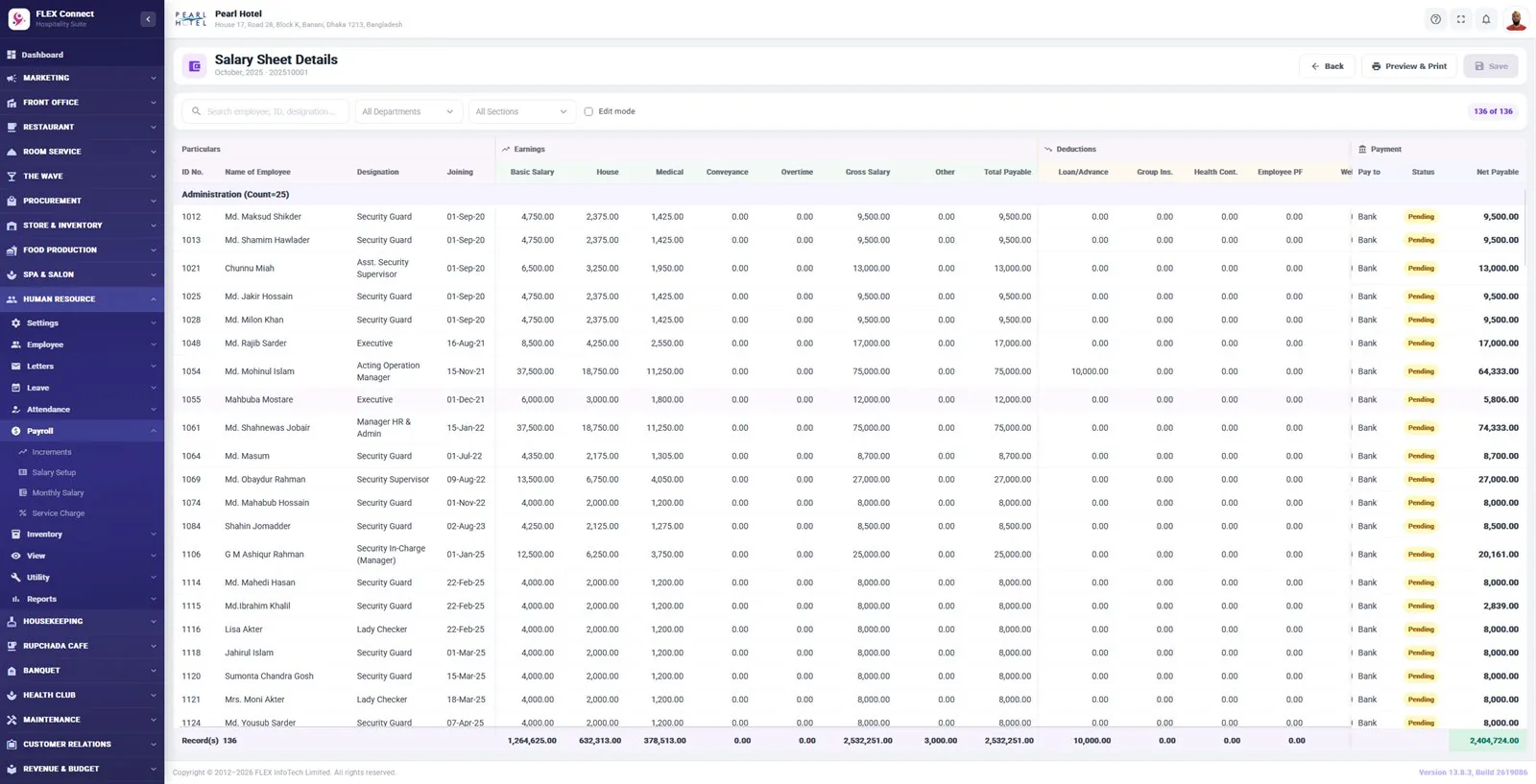
Each employee should have a salary setup that holds their basic salary and allowances, so the monthly run does not start from a blank sheet. The salary sheet then adds the month's earnings, subtracts the month's deductions and shows the net payable for every person, grouped by department and section.
A typical salary sheet for a hotel or restaurant includes the columns below. Your own will depend on your pay structure and policies.
- Earnings: basic salary, house rent, medical, conveyance and overtime
- Gross salary and any other payments
- Deductions: loans and advances, group insurance, health contribution and employee provident fund
- Payment method, for example bank or cash
- Payment status and net payable
Service charge: share it on the same run
Many hotels and restaurants collect a service charge and share it with staff. Doing that outside payroll, on a separate sheet, is where mistakes and disputes start. Distributing service charge in the same monthly run keeps one record of what each person received.
Agree the distribution rules in writing, apply them the same way every month and show the service charge amount on each payslip. FLEX HR handles service charge distribution together with the monthly salary.
Check, approve and pay
Never pay from a salary sheet nobody has checked. Compare the totals with last month and look into any large changes, such as a big jump in overtime or a department whose cost moved sharply. Filter the sheet by department and section so each manager can confirm their own team.
Once approved, pay by bank where possible and mark each line as paid. Print or export the sheet for the accounts team, and keep it with the month's records.
Payslips and questions from staff
Staff who can see their own payslip and leave balance ask HR far fewer questions. A mobile app is the simplest way to give shift workers that access, because many never sit at a desk.
With FLEX HR, staff and managers can check leave and payslips on the FLEX Connect mobile app (Android & iOS), and HR can produce offer, appointment, confirmation, promotion and exit letters from the same employee record.
Close the month
After payment, record the salary cost in the books, by department where you use cost centers. If you keep accounts in the same system, for example by adding FLEX Accounts, salary and service charge costs reach the trial balance without being entered twice.
Payroll rules, tax and statutory deductions differ between Bangladesh and Bhutan and change over time. Agree your pay structure and deductions with your accountant or adviser, and set them up once in your system.
Frequently asked questions
What should a monthly salary sheet include?
At least each employee's earnings, such as basic, house rent, medical, conveyance and overtime, their deductions, such as loans and advances, insurance, health contribution and provident fund, the payment method and the net payable, grouped by department.
How do I stop payroll errors?
Close attendance and leave before the run, enter joiners, leavers and increments first, then compare the totals with last month before anyone is paid. Most errors come from the inputs, not the calculation.
Can service charge be paid through payroll?
Yes. Distributing service charge in the same monthly run keeps one record of what each person received. FLEX HR handles service charge distribution together with the monthly salary.
Can staff see their payslips on the phone?
With FLEX HR, yes. Staff and managers can check leave and payslips on the FLEX Connect mobile app (Android & iOS).